How to get your active listings file
Sign in to eBay on a computer and open Seller Hub.
- Click Reports.
- Click Downloads. You can also open the Downloads page directly.

- Click the blue Download report button.

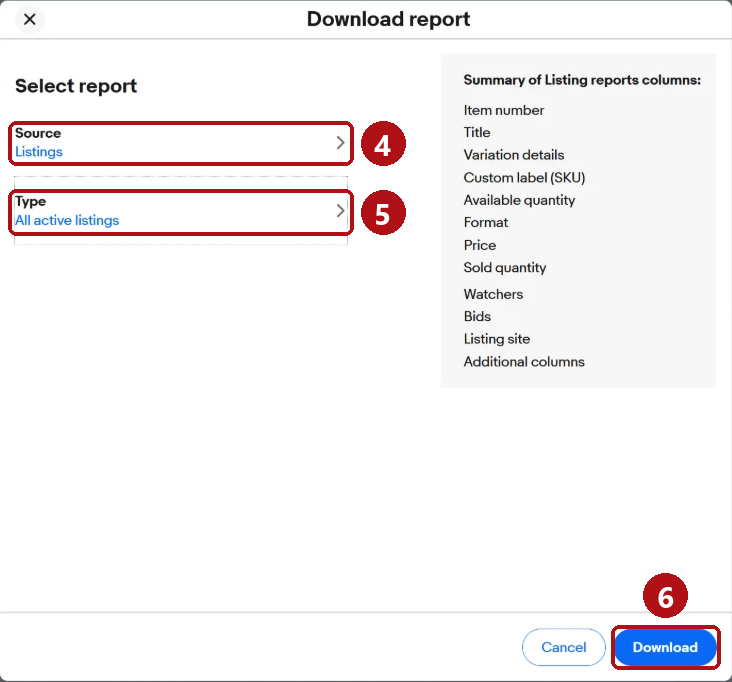
- Click Source and choose Listings.
- Click Type and choose All active listings.
- Click Download. eBay prepares the file; a large store may take a minute or two.
- Wait until Status says Completed. Refresh the page if it does not change.
- Click Download on that row. The file usually goes to your computer's Downloads folder.

The name will look like eBay-all-active-listings-report-2026-10-10-12345678901.csv.
Come back to the tool and drop that file in the box. Use the downloaded CSV as it is; opening and re-saving it in Excel can change item numbers or the file's format.
Things that go wrong
I don't see Seller Hub.
Seller Hub is free. Open Seller Hub and follow eBay's prompts to get started. eBay says private sellers need at least one previous sale to get access.
I'm on my phone.
Use Seller Hub in a browser on a computer. On a phone, try your browser's desktop view instead of the eBay app.
The Downloads link is not where you say.
eBay's layout can vary. Use the direct Downloads link from step 2.
The Type list does not show All active listings.
If the list won't scroll to it, try opening Seller Hub in another browser.
I have more than one eBay account.
Download and check one account's file at a time.
Is this safe?
Choose the All active listings report: it contains listing details such as titles, prices, quantities and item numbers, rather than passwords or buyer information. Only item numbers, titles and category names and numbers are uploaded for screening. SKU, stock quantity, price, variation descriptions and other columns are removed in your browser. The whole CSV is not uploaded. See the privacy page for how reports are stored and deleted.
I have my file - check my listings
Steps checked October 2026. If eBay's menus have changed, look for Reports, then Downloads, in Seller Hub.